
The short answer: Mount your video doorbell at 1.2 metres (4 feet) from the ground, angled slightly downward, on the hinge side of the door. This height captures visitors' faces clearly, shows packages on the doorstep, and optimises motion detection. Every major manufacturer — Ring, Arlo, Eufy — recommends 1.2 metres. Here's everything else that matters.
Table of Contents
Why Doorbell Mounting Height Changes Everything
I've been working in UK security for over 20 years. In that time, I've seen more poorly positioned doorbells than I care to remember — cameras pointing at the sky, cameras buried so low they trigger on passing cats, cameras facing directly into the morning sun.
A video doorbell positioned wrongly is genuinely worse than no doorbell at all. It gives you a false sense of security while recording nothing useful. And repositioning after installation — refilling holes, repainting, running new cable — is far more work than getting it right first time.
This guide covers the specific decisions that affect mounting position — height, angle, side of door, sun exposure, theft prevention, and the UK-specific considerations that most guides ignore.
The Right Doorbell Mounting Height
The 1.2 Metre Rule
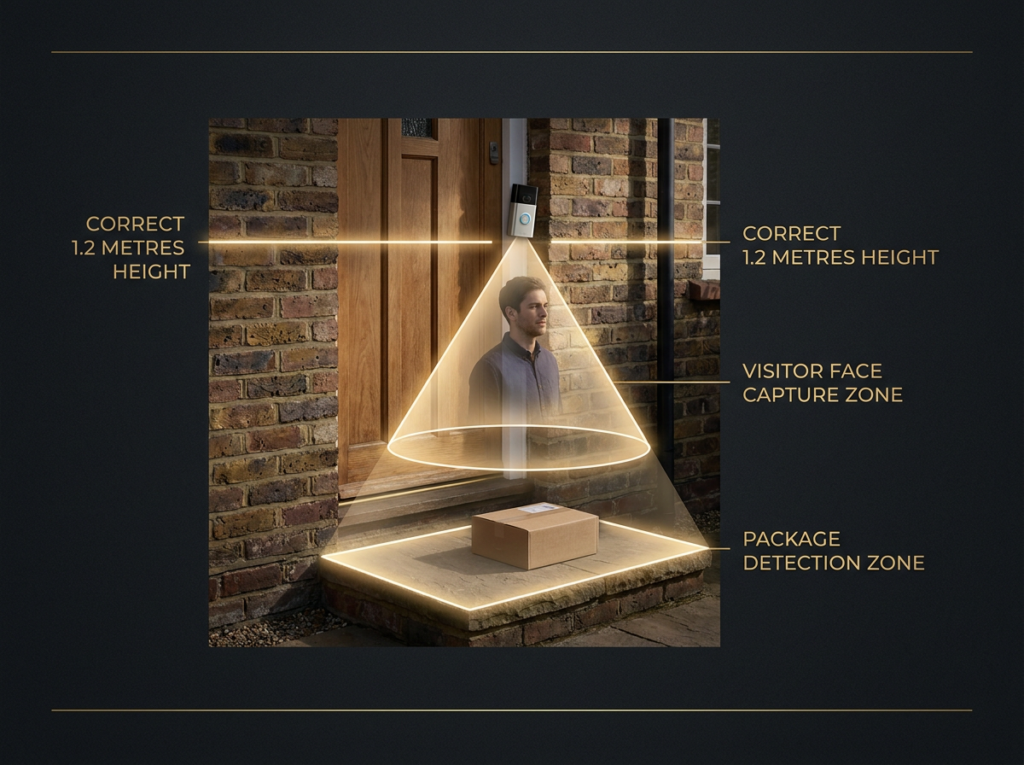
Doorbells should be mounted 1.2 metres from the ground for optimal motion detection. This is the official recommendation from Ring. The optimal height for Arlo doorbell camera installation is also around 1.2 metres above the ground — a camera at this height can see the front entry area well, allowing the camera to clearly see visitors' faces, as well as capture motion detection events.
At chest height — between 1.2 to 1.6 metres from the ground — the camera provides a clear view of faces, not just the tops of heads, and captures packages and activity around the doorstep.
Why 1.2 metres specifically:
- Face capture: At 1.2m, the camera aligns with the chest-to-face zone of an average visitor. You see eyes, nose, mouth — identifiable features.
- Package visibility: Low enough to show packages and parcels left on the doorstep.
- Motion detection: Most doorbell PIR sensors are optimised for this height. Too high or too low and you get inconsistent alerts.
- Theft deterrence: High enough to be difficult to grab quickly, but not so high it becomes a ladder job.
What Happens at the Wrong Height
Too high (above 1.6 metres): You capture the tops of heads. Useless for identification. Packages disappear from frame — you have no evidence a delivery was made or taken. Motion detection fires inconsistently because the sensor is angled too steeply. Most importantly: it becomes harder to steal, but also harder to see anything useful.
Too low (below 1.0 metres): False motion alerts from foxes, cats, and wind-blown leaves at ground level. Visitors can deliberately crouch below the frame. Easier to tamper with or steal. Children are captured but adults may not be — too many missed events.
Adjusting for Elevated Doorways
Many UK properties — particularly period houses and properties with steps up to the front door — have elevated thresholds. If your doorway is elevated, consider lowering the doorbell slightly to keep the camera at face level for visitors.
If visitors approach up a flight of steps, mount the doorbell at the same height from the door frame — but consider that visitors will be at a higher elevation when they reach you. A wedge bracket angling the camera slightly toward the approach path often helps.
The Right Doorbell Mounting Angle
Point Slightly Downward
The best angle is pointing slightly downwards — this ensures faces are in the frame, not just the tops of heads.
Most video doorbells come with a standard mounting bracket that holds the camera level. Most also include an angled wedge bracket. Use the wedge bracket if:
- Your door is recessed into a porch (camera needs to angle out toward the approach)
- Your approach path is elevated relative to the doorbell position
- You're mounting on a corner or angled surface
A 5–10° downward tilt at 1.2 metres puts the camera looking at the face zone at approximately 1.7–2 metres distance — exactly where a visitor pressing the button stands.
Avoid Tilting Up
Never mount a doorbell angling upward. You'll capture ceiling, sky, and the underside of any overhang — and nothing useful. If your mounting position forces an upward angle, choose a different position.
Which Side of the Door
Mount on the side that provides the clearest view of your approach path. If your door has a sidelight, mounting it on the door frame on the handle side is often best. If there's no frame space, the wall beside the handle side is the next best option.
In practice for UK homes:
Most UK front doors open inward. The hinge side of the door provides a more stable mounting surface and positions the doorbell so visitors naturally face it when reaching for the handle. For right-hand opening doors (hinges on the left), mount on the right-hand side of the door frame.
The approach matters more than the door side. If your path approaches from the left, mount on the left — you want visitors in frame as they approach, not just when they're already at the door.
Sun Exposure — The Problem Nobody Mentions
This is the single most overlooked positioning decision in UK doorbell installation. I've seen footage from sun-facing doorbells that is essentially unwatchable — a blown-out white haze for most of the day.
East-facing front doors (most common in terraced UK streets running north-south) get direct morning sun. A doorbell pointing east will be looking directly into sunrise from around 6am–10am in summer. Footage during this window is often unusable.
West-facing front doors get afternoon and evening sun — typically 3pm–8pm in summer. Critical for identifying visitors arriving after work.
Solutions:
- Overhang: If your doorbell can be positioned under an overhang or porch roof, direct sun is less of a problem. The camera isn't pointing at the sun itself.
- Wedge bracket: Angling the camera slightly away from the sun's path reduces direct lens flare.
- HDR: Doorbells with HDR processing (Google Nest, Arlo 2K) handle contrast better than those without. On a sun-facing door, HDR is almost essential.
- Time of day: Check your footage at the times you're most concerned about. A doorbell that's clear at noon but useless at 8am is a problem you can detect early.
UK-Specific Mounting Considerations
uPVC Doors and Frames
The majority of UK homes built since the 1980s have uPVC front doors. uPVC door frames present a specific challenge: drilling into uPVC can crack the frame and void any warranty on the door or frame.
Options for uPVC mounting:
- Wall beside the door: Most UK uPVC front doors have brick or render immediately beside the frame. Mount on the wall at frame level. This is the safest and most common solution.
- Adhesive mounting: For renters or anyone avoiding drilling, high-strength adhesive brackets are available for most doorbell models. Suitable for smooth surfaces — not for painted render or pebble dash.
- No-drill wedge mounts: Some aftermarket accessories (Eufy, Ring) include peel-and-stick wedge options for zero-damage installation.
See our installation guide for full step-by-step installation advice.
Terrace Houses with Close Street Access
On a typical East London or Victorian terrace, the front door may be just 1–2 metres from the pavement. This creates two specific problems:
Camera position: At 1.2 metres and 1–2 metres from the pavement, your doorbell will capture everyone on the pavement at very close range. ICO guidance requires you to aim cameras at your own property only. You should minimise recording beyond your boundary and use privacy filters if available. Use the privacy zone/masking feature in your doorbell app to block out the pavement area. See our full GDPR guide for legal obligations.
Theft risk: Very close to the street means the doorbell is easily reachable without a ladder. See the anti-tamper section below.
Flats and Communal Entrances
If you live in a flat, you likely have two options: mount at your flat door (communal hallway) or at the main building entrance (if you have access and permission). See our guide for flats for the specific considerations around communal areas and GDPR.
Key point: recording footage of a communal hallway means your camera is capturing other residents. This requires a stronger legal justification and ideally written permission from your landlord or management company.
Victorian Properties and Thick Walls
Victorian terraced properties often have very thick brick walls (230mm+ single-skin brick or cavity walls). Drilling for cable runs is more involved. Battery doorbells avoid this — but Wi-Fi signal through thick Victorian walls is often poor.
For Victorian properties with poor front-door Wi-Fi:
- Use a mesh Wi-Fi extender near the hallway
- Consider the Aqara G400 with PoE — run an Ethernet cable instead of relying on Wi-Fi
Anti-Tamper Positioning — Protecting Your Doorbell
Doorbells get stolen. I've seen it happen. The footage is always the same: someone walks up, looks directly at the camera, reaches up, and removes it in under 10 seconds.
Height: At 1.2 metres, a doorbell can be removed by anyone who reaches for it. At 1.8–2 metres, it requires at least some effort to reach. The trade-off: above 1.6 metres, footage quality degrades. The balance is usually 1.4–1.5 metres — slightly above the optimum, but significantly harder to grab.
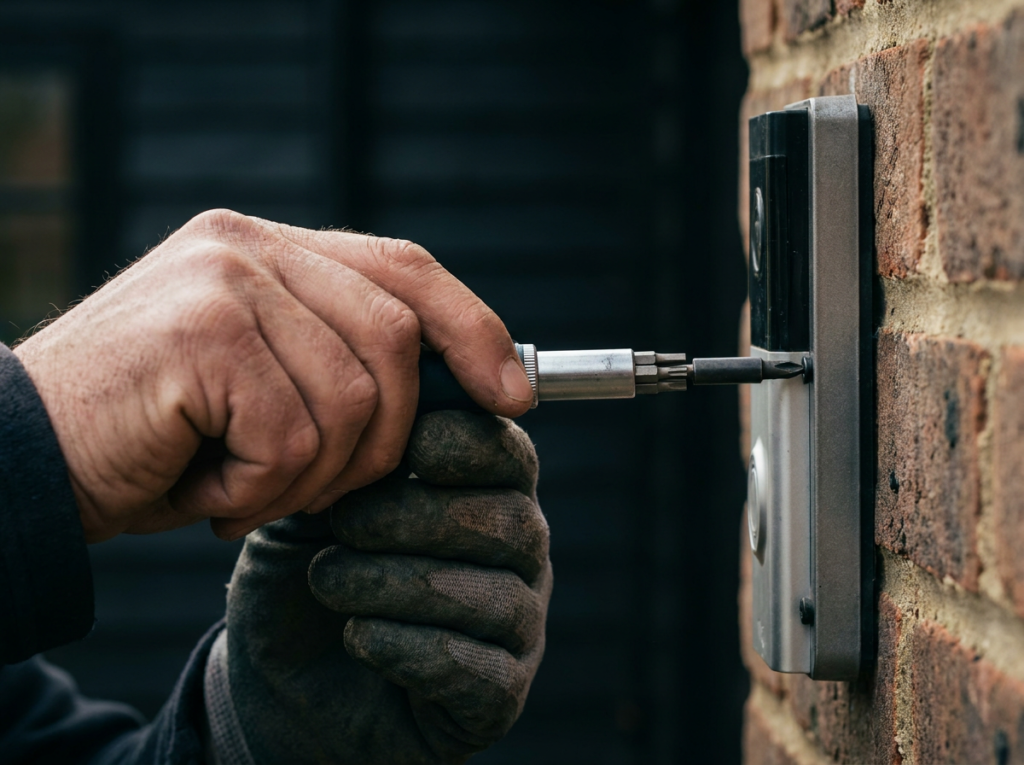
Tamper mounts: All major brands offer anti-tamper screws — typically requiring a specialist bit included in the box. Use them. Most quick doorbell thefts happen because the standard screws are accessible with a common tool.
Tamper alerts: Most modern doorbells send a push notification if the device is physically moved or the mount is disturbed. Enable this in your app settings. Combined with local storage (on the Eufy E340), you have footage of the theft stored on the device — accessible even after it's removed.
Position relative to other cameras: If you have an outdoor camera or CCTV, position it to cover the doorbell location. A camera that watches the doorbell from a different angle provides coverage if the doorbell itself is taken.
Wi-Fi Signal — Test Before You Mount
Before mounting your doorbell, test the Wi-Fi signal at the planned position. Install the doorbell app, connect the doorbell to Wi-Fi temporarily, and check the signal strength indicator.
If signal is poor:
- Try a mesh Wi-Fi extender or access point near the hallway
- Consider dual-band 5GHz if your router supports it (Ring Wired Pro, Arlo 2K)
- For the most reliable solution, use PoE (Aqara G400)
A doorbell mounted in a weak Wi-Fi spot will disconnect regularly, miss events, and deliver choppy two-way audio — defeating the purpose entirely.
See our Wi-Fi guide for minimum requirements.
Mounting Position Checklist
Before you drill, run through this checklist:
- ✅ Height: 1.2 metres from ground (adjust slightly for elevated doorways)
- ✅ Angle: Slightly downward, facing the approach path
- ✅ Side: Handle side of door or wall with clearest approach view
- ✅ Sun: Not pointing directly into sunrise or sunset
- ✅ Wi-Fi: Signal tested and confirmed adequate at this position
- ✅ Privacy: Will camera capture beyond your property? Use privacy zones
- ✅ Tamper: Anti-tamper screws fitted, tamper alerts enabled
- ✅ uPVC: Mounting on wall beside frame, not into uPVC itself
- ✅ Obstructions: No plants, walls, or decorations blocking the lens
- ✅ Rain: Not positioned where water pours directly onto the unit
Common Mounting Mistakes — and How to Avoid Them
Mistake 1: Mounting too high "for a better view" Higher doesn't mean better. Above 1.6 metres, you lose face detail and package visibility. 1.2 metres is the optimum — follow the manufacturer recommendation.
Mistake 2: Ignoring sun angle Test footage at the time of day you care about most. A doorbell that's clear at noon but blinded by afternoon sun at 5pm is a problem you can avoid by testing before you commit to a position.
Mistake 3: Mounting on uPVC frame Use the wall beside the frame. Drilling uPVC risks cracking, frame warranty issues, and structural weakness.
Mistake 4: Not testing Wi-Fi before mounting Spend five minutes checking signal before you drill. A battery doorbell that can't maintain a reliable connection at your chosen spot needs a different position or a Wi-Fi extender.
Mistake 5: Skipping tamper screws They're included in the box for a reason. Every doorbell theft I've seen happened because the standard screws were accessible. Use the tamper screws, keep the specialist bit somewhere safe.
Mistake 6: Not using activity zones after installation Once mounted, go into your doorbell app and set activity zones — areas where motion should trigger an alert. This reduces false alerts from the road or neighbours' gardens and focuses the doorbell on the area you actually care about.
Frequently Asked Questions
How high should I mount a video doorbell? 1.2 metres from the ground — confirmed by Ring, Arlo, and Eufy as optimal for motion detection and face capture. Slightly higher (1.4–1.5m) if theft risk is a concern in your area.
Should the doorbell face the door or the approach? The approach. Position it to capture visitors as they walk toward your door, not just when they're already standing at it. The best footage of a suspicious visitor is from 3–5 metres away, before they reach the door.
Which side of the door should the doorbell be on? The side that provides the clearest view of your approach path. Usually the handle side. If your path approaches from a specific direction, favour that side.
Can I mount a video doorbell on a uPVC door frame? Not recommended — drilling into uPVC risks cracking. Mount on the brick or render wall immediately beside the frame instead.
How do I stop my doorbell being stolen? Use the anti-tamper screws included in the box. Consider mounting 1.4–1.5 metres high (slightly harder to reach). Enable tamper alerts in the app. Position any additional cameras to cover the doorbell location.
Does mounting height affect motion detection? Yes significantly. If mounted too high or too low, you may encounter inconsistent motion detection or undesired motion events. 1.2 metres is the optimum for most PIR motion sensors.
What if my front door gets direct sunlight? Choose a doorbell with HDR (Google Nest, Arlo 2K) for better contrast handling. Use the wedge bracket to angle slightly away from direct sun. Check footage at the problem time of day before finalising position.
Last updated: June 2026. As an Amazon Associate, we earn from qualifying purchases at no extra cost to you.